What can you do with Airwave?
From the educational to the expressive and the plain entertaining, we explore some of the most interesting use cases.
Yes, we’ve spoken about Airwave a lot here on the blog. We’ve told you all about how it’s a revolutionary new bit of kit, a breakthrough in spatial AI, a way to unlock new dimensions of musical expression… but what can you actually do with it?
Quite a lot, it turns out. The first Airwaves are now out in the real world and people are finding all sorts of inventive uses for them — including a few we could never have seen coming.
So, whether you’re just getting to grips with the piano or looking to extend your expression to the air above it, read on to see exactly what Airwave might do for you — chances are there’s at least one you won’t have seen coming.
Find new ways to progress on the piano
Learn to play with ROLI Piano and Piano M, and you’ll be evaluated own every song across three dimensions of your playing — Harmonic, Rhythmic, and Dynamic. That is, playing the right notes, at the right time, and at the right volume. It’s not a test, it’s a way to spot your strengths and weaknesses, work on them, and track your improvements over time.
Add Airwave, though, and things get really interesting. At the end of each song, you’ll see scores for the three Dimensions of Progress you’re used to, but also two new ones: Postural and Positional.
Postural is about getting your hands and wrists into the right position to play fluidly and safely (yes, really — strains can and do happen!).
Positional accuracy is all about using the right fingers on the right note — the app itself makes this easy with color coding, and Airwave takes things one step further by displaying your fingers, in 3D highlighted in the correct color, on the screen as you play.
Be the first to try AI Music Coach
AI Music Coach is our latest beta feature — and, more importantly, the first digital piano-learning experience that can both see your hands and respond in real time to provide intelligent, conversational guidance as you practice. You play, it watches and listens to every note. You talk, it hangs on your every word and talks back.
AI Music Coach (Or “Roli” to its friends), is built into the ROLI Learn app and unlocked by Airwave. To make it work seamlessly, we’ve brought together several advanced technologies — from computer vision to natural language processing and the cutting edge of music education.
AI Music Coach is like having a piano teacher by your side every single time you sit down to practice.
Explore musical ideas — in new dimensions
Airwave, as you may already be aware, isn’t just for learning music written by other people. At ROLI, we believe there’s music in everyone — it’s sort of our whole deal, actually. You don’t need to be Paul McCartney to write brilliant songs of your own, in other words, though it would hurt to brush up on some Beatles tunes for inspiration first.
Paired with the very same ROLI Piano or Piano M you may already have been learning on, a Seaboard, or indeed any standard MIDI controller, Airwave transforms into an endlessly expressive accessory — allowing you to play the air above your keys (or Keywaves, pads, knobs, buttons…)
Everything you need to start making music of your own is included: Airwave comes with Airwave Player, a virtual instrument for your Mac or PC that’s packed with preset sounds, each created by our expert team of sound designers and configured to work with all six Dimensions of Air.
You can raise your hands to create a crescendo, tilt your wrists to take fine control, glide from side to side to uncover new sonic layers, slide from front to back to add intensity and flex your wrists at the same time to tweak any and all of the above. And for a dramatic ending, just make a fist.
Sculpt uniquely expressive sounds of your own….
Okay, maybe you knew all about Airwave’s music-making capabilities — but you may have missed this powerful recent update. Airwave Player is built on the engine of our flagship do-it-all super synth, Equator2. On launch, that was all hidden away in favour of a more immediate experience: you plug everything in, play a note, raise your hands and the magic just happens. It sounded just like Equator2 (that is to say, stunning) but you didn’t need to get to grips with multiple sound sources, filters, or routing possibilities to start making music.
Of course, some of us really like that stuff — and now we can have it. With the latest free update to Airwave Player, an inconspicuous new Edit button has appeared at the top of the interface. Click it to peel back Airwave Player’s flashy 3D visuals and expose the full, unadulterated Equator2 patch behind it. You really do get access to everything — the full interface is here, and just as powerful as the standalone synth.
For some tips on getting started with Airwave Player’s newfound sound design superpowers, check out ROLI Sound Design and Innovation Manager Marcus’s walkthrough above.
… or just download Sam Gutman’s
Of course, with great sound-design power comes a great number of knobs, buttons, envelopes, and other interface intricacies. If you’re excited by the possibilities but need a little time to get familiar with all the parameters, we recommend checking out Sam Gutman’s free sound pack in the meantime.
You may know Sam from previous ROLI blog posts and videos — he’s a Seaboard maestro and an accomplished touring musician who’s performed alongside Lauryn Hill, The Fugees, Wyclef Jean, Busta Rhymes, Lil' Wayne, Nas, Doechii, and many, many others.
Check out some of the sound in Sam’s own video above, and update your Airwave Player to the latest version to check them out yourself — they’re now built right in.
Conduct your whole studio
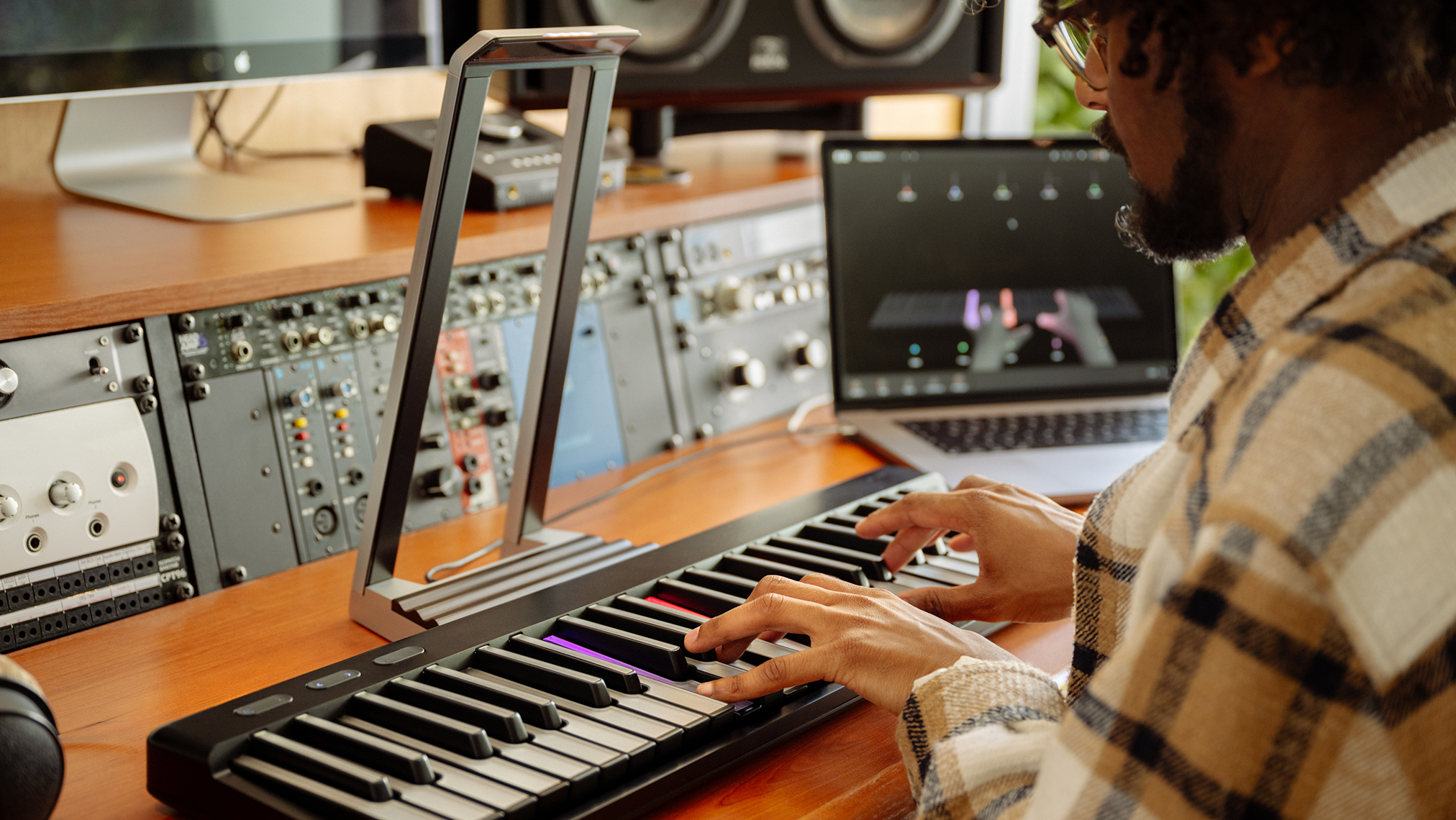
Airwave’s sonic capabilities don’t end with Airwave Player. Much as it’ll work with just about any MIDI controller you care to pair with, it can also be used to control any synthesizer, effect, or software instrument that accepts standard MIDI data. Using the included Airwave Control software and a helping hand from your DAW of choice, you can route MIDI CCs from all six Dimensions of Air to anywhere you like.
The possibilities are virtually endless — you might breathe new life into an old synth, conduct an entire orchestra of sampled instruments, or control your next live set with gestures the whole audience can see.
Play Minecraft
When we said you could use Airwave to control anything you liked, we meant it — within reason. YouTuber Jacob Durbin took us at our word, switched his camera on, and immediately set about figuring out how ROLI Vision might help him gather resources, craft tools, and build bases more efficiently than ever before — or any least in more dimensions than usual.
Did it work? Kinda. Was it worth it? We’re not sure, but the video above is worth twenty minutes of your time.
We knew we’d see some inventive uses for Airwave once it was out in the wild, but this one took us by surprise. Have something even more inventive in mind? More expressive? More useful, even? We want to hear about it — be sure to share it with us @roli_create.
Secure your Airwave now
Feeling inspired? Whether you’re looking to learn piano, spice up your studio setup, or make Minecraft way harder to play, now’s the perfect time to order your very own Airwave — or go all in with a bundle.
Join the ROLI community